

We've added an AI assistant to the SpiceDB Playground, and the short version is: it gets you from an idea to a working, tested permission model faster. It writes and edits your schema, generates relationship data and assertions to test it, runs permission checks, and can explain exactly why a check was granted or denied — all from a normal conversation, without leaving the browser.
The Playground has always been the easiest way to try SpiceDB: nothing to install, a real build of SpiceDB running via WebAssembly, and enough example schemas for inspiration before you write your own. The Assistant builds on that: learning and iterating on a permissions model now feels less like reading documentation and more like asking someone who's done it before.
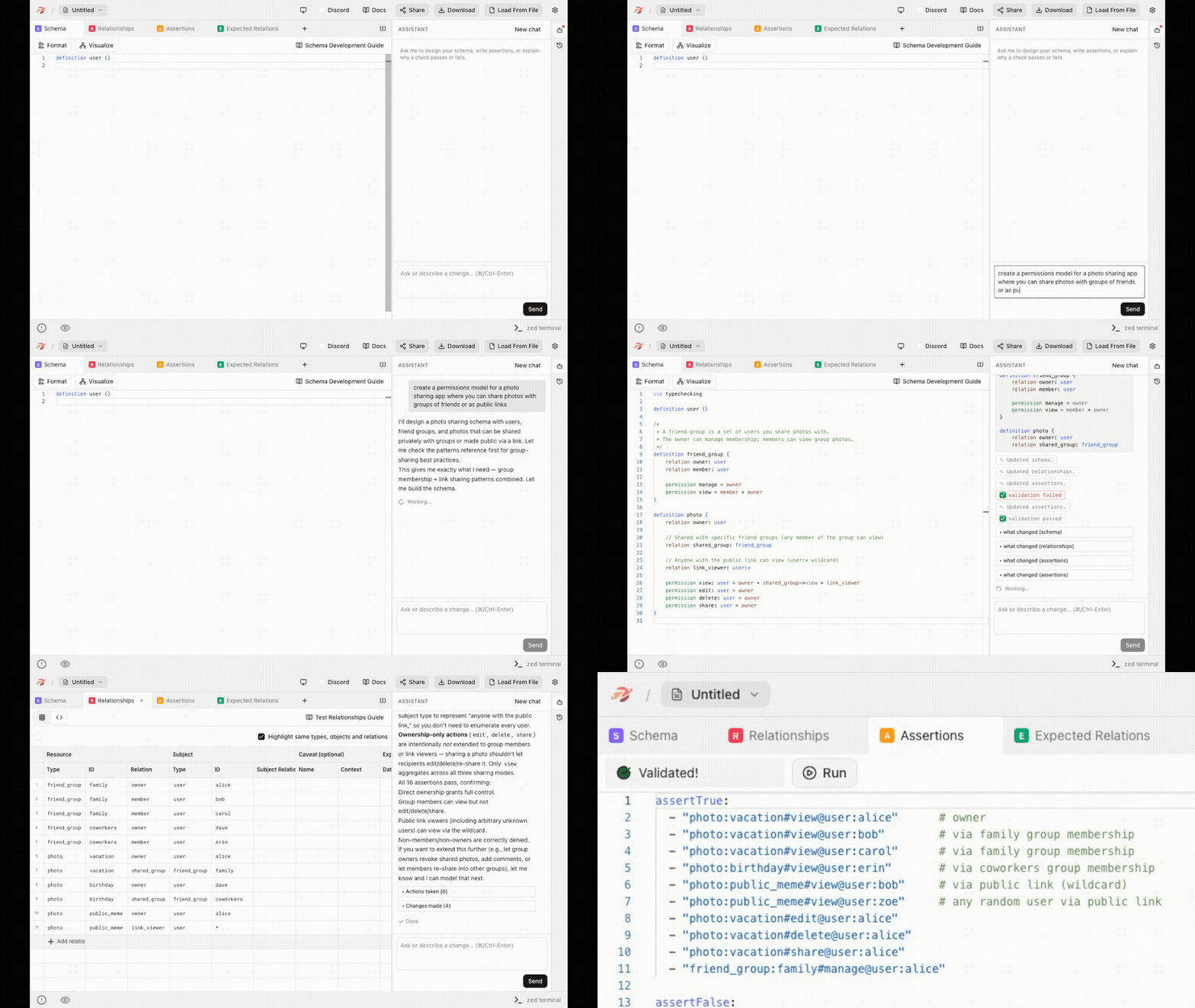
What the Assistant does for you
Learn. You're new to SpiceDB and have an idea for a permissions model but don't know where to start. You can ask the Assistant to write a first draft, or just ask it questions: what a relation is, how this differs from plain role-based access control, why a pattern exists the way it does. More approachable than having to search through the docs.
Build. You want to extend an example schema. Describe the change you want and the Assistant makes it: schema edits, matching relationship data, and assertions that check the change actually does what you asked for. It validates its own edits before applying them. You get something tested, not a snippet you still have to wire up yourself.
Understand. You run a permission check but don't understand the result. Ask why it came out that way. The Assistant pulls the real trace and tells you which path in the relationship graph produced the result. Ask to add more test data if you want to dig into it further.
Iterate. You have an idea for optimizing your schema. You can prompt the Assistant to implement it. The Assistant keeps a revision history for the session, so you can revert to any earlier point and try a different direction if your idea didn't quite work. Makes it cheap to just try things and see what happens.
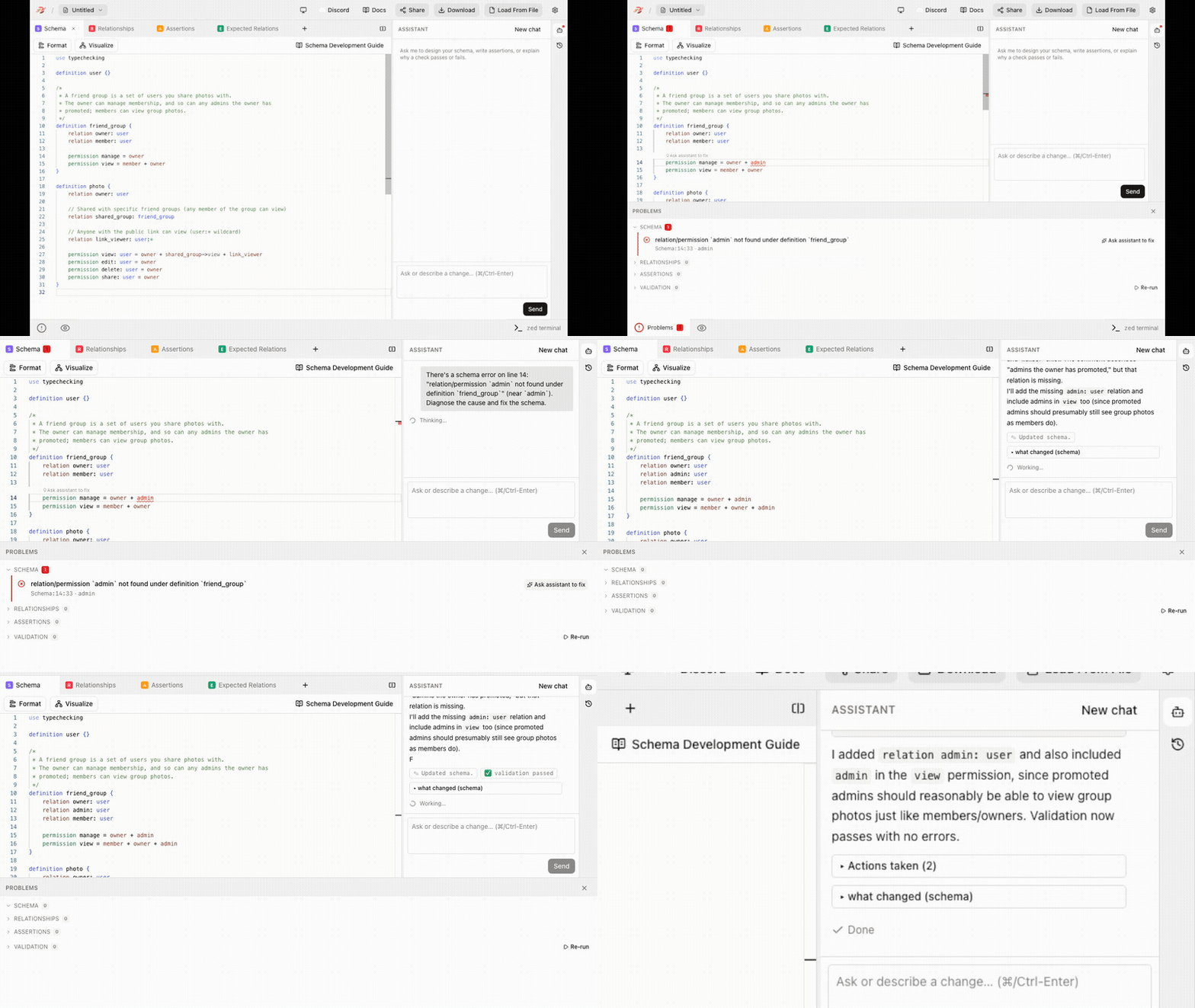
Everything it can do (with prompts to try)
Schema and relationship data
- Write a schema from a plain-language description of your permissions model
- Add, remove, or modify relations and permissions in an existing schema
- Generate example relationship data that matches your schema
- Generate or update assertions and expected-relations tests
Checks and validation
- Run a permission check and report the result
- Run schema and relationship validation
- Ask the Assistant to fix a schema error
- Explain a check with the full debug trace — which path in the relationship graph was traversed for the result
Revision history
- Keep a revision history across the session
- Revert the schema, relationships, or assertions to any earlier point
Reference
- Ask questions about the schema language and ReBAC concepts
- Get a best-practice tip on request
A few prompts worth copy-pasting in to try it yourself:
Write a schema for a project management tool with owners, admins, and members.Add a "commenter" role that can view and comment on tasks but not edit.Add test relationships for a project moonshotWhy is alice denied view access on project:moonshot?Generate more test relationships to cover the admin role.Revert to the version before adding the commenter role.What's a common mistake people make modeling multi-tenant permissions?Give me a random schema design tip.
Playground as an entry point
None of this is a simulation. The Playground runs an actual build of SpiceDB and the zed CLI, compiled to WebAssembly, so the checks and validation you run give you the same answers a production cluster would.
That's always been true of the Playground and it's why what you build there is actually usable afterward. When you're ready, AuthZed Cloud gets you a hosted SpiceDB instance to run that same schema in a few minutes.
AI tools for SpiceDB
The Assistant is built on spicedb-dev, a plugin we maintain for coding agents. In the Playground it's scoped to your browser session, but the plugin itself is a more capable, end-to-end tool that integrates directly with Claude Code or Codex. When you're ready to move from designing a schema to integrating it into a real application, the plugin can work with your coding agent in your own codebase.
Try the Assistant now at play.authzed.com, and find spicedb-dev in the authzed-marketplace when you're ready to go further.