
As part of my job, I get to interact with technologists at local meetups and conferences. Recently when hosting an Agentic RAG workshop at Code Europe Warsaw, I got asked a question which I’ve been asked many many times before:
“The company I work for has multiple authentication technologies. How do I federate fine-grained permissions across all of them”.
I’ve seen this pattern not just in really large enterprises but also in holding companies, startups that have just been merged / acquired, and even companies with different regulatory requirements for contractors.
This is the federated authorization problem. Essentially, it is a gap when teams rely on incompatible identity providers (IdP) that cannot be instantly unified. This creates a barrier where shared resources remain inaccessible to large user populations, making impractical identity migrations the only traditional path forward. This problem persists with the implementation of RAG pipelines and internal chatbots too.
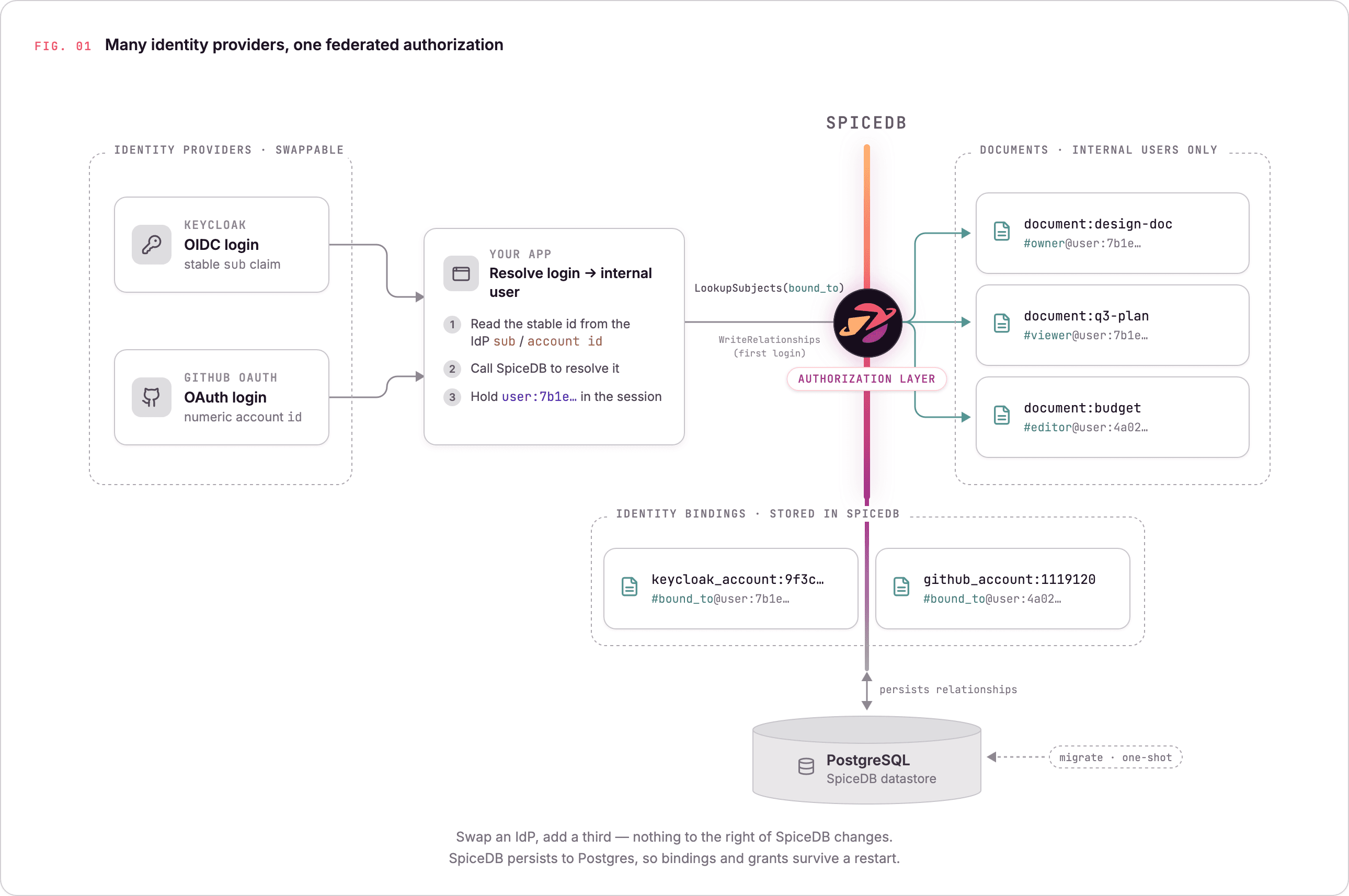
So I built a small demo to illustrate how to solve this problem. The demo has two authentication mechanisms — Keycloak on one side, GitHub OAuth on the other with SpiceDB doing the authorization in the middle across the two Identity providers. You can easily add another authN mechanism (for example: one specifically for your Agents) and the architecture remains the same. The blogpost talks through the patterns and best practices to follow while building federated authorization.
TL;DR: To solve the federated authorization problem caused by incompatible identity providers, you can use SpiceDB to centralize permissions by mapping disparate external accounts to a single, unified internal user model.
Using one internal identity
The approach here is not to let your documents point at "the GitHub user" or "the Keycloak user" but instead point them at an internal user that you own, and let each external account bind to it.
We’re going to use SpiceDB — the most comprehensive (yes, I'm biased) open-source implementation of Google's Zanzibar paper, to handle the authorization half. If you aren’t familiar with SpiceDB & ReBAC, I suggest you read the SpiceDB documentation, but here’s the tl;dr - You can create and apply a schema that models your app’s resources and permissions that can be computed off the relations between them. Then client libraries are used to insert relationships or check permissions in the app. We’re going to create relationships between these logged in users and the documents they can access.
A schema for this usecase looks like this:
definition user {}

definition keycloak_account {
    relation bound_to: user
}

definition github_account {
    relation bound_to: user
}

definition document {
    relation owner: user
    relation editor: user
    relation viewer: user

    permission edit  = editor + owner
    permission view  = viewer + edit
    permission share = owner
}
Read the schema bottom-up to understand it. A document has owners, editors, and viewers, and every one of them is an internal user. Nothing in the document definition knows that Keycloak or GitHub exist. Above it, keycloak_account and github_account are separate object types, each with a bound_to relation pointing at that same internal user.
When someone logs in through Keycloak, I use the sub claim (the stable, unique identifier the IdP promises won't change) from their token and ask SpiceDB who keycloak_account:<sub> is bound_to — a LookupSubjects call that hands back the internal user:<uuid>. A GitHub login does the same thing with GitHub's numeric account id.
keycloak_account:9f3c…    #bound_to@user:7b1e…
github_account:1119120    #bound_to@user:4a02…
The document on the right only ever points at internal users. It has no idea Keycloak or GitHub exist. You could swap an IdP, add a third, and nothing to the right of that middle column changes.
Email is not identity
Why use the OIDC sub instead of an email address? Email addresses are mutable and can change over time, whereas the OIDC sub is stable and immutable. Additionally, this approach intentionally avoids account linking. Even if a user logs in via multiple providers (e.g., Keycloak and GitHub) using the same email, they are treated as distinct internal users, ensuring data integrity.
Time for Permission Checks
Once a request has resolved to a user:<uuid>, authentication is done and it’s time to check for permissions. The idea behind checking permissions in SpiceDB can be distilled to a question in this format:
can user:U do X to resource:R?
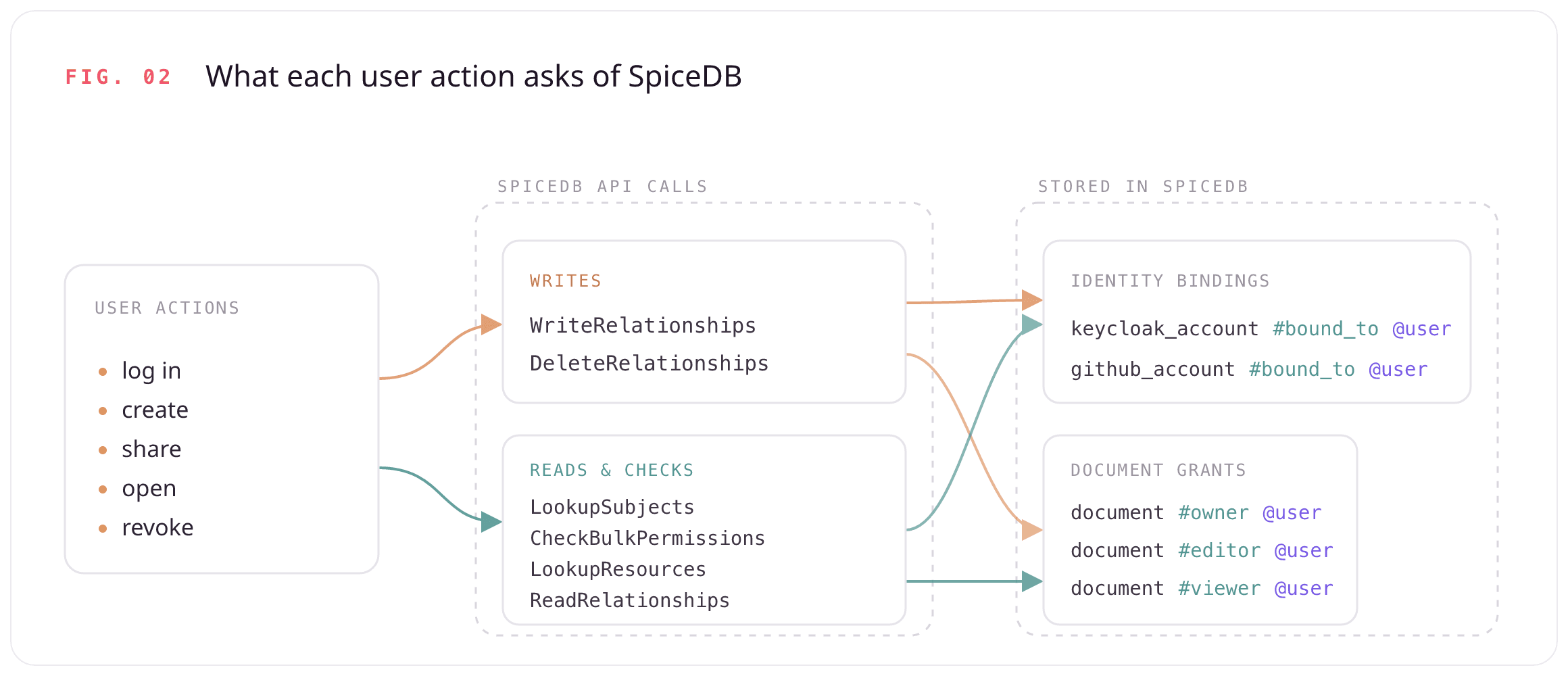
That question shows up in three shapes, each matching something the UI needs to do. Zoom out, and every click a user makes — logging in, creating, sharing, opening, revoking — comes down to a handful of calls against SpiceDB: writes that record the facts, and reads and checks that ask about them.
-
Gate a single action uses
CheckPermissionto ask one yes/no question before rendering a document,pythonresp = client.CheckPermission(CheckPermissionRequest( resource=object_ref("document", doc_id), permission="view", subject=subject_ref("user", user_id), consistency=at_least_as_fresh(zedtoken), # more on this later )) allowed = resp.permissionship == PERMISSIONSHIP_HAS_PERMISSIONBut opening a document isn't one question, it's three: Can I view it? Can I edit it? Can I share it? That's what decides whether the page renders the edit form and the share panel. Rather than fire three round-trips, the demo batches them into a single
CheckBulkPermissionscall:pythongranted = check_permissions_bulk( client, "document", doc_id, ["view", "edit", "share"], user_id, zedtoken ) # granted == {"view": True, "edit": True, "share": False} -
Granting access uses the
WriteRelationshipsAPI. Permissions are written as relationships. For example: When you create a document, you write exactly one tuple:document:design-doc#owner@user:7b1e…You don't write separate
view,edit, andsharegrants. You writeowner, and the schema computes the rest:zedpermission edit = editor + owner permission view = viewer + edit permission share = ownerSimilarly, revoking a share is the deletion of a relationship. SpiceDB has the
DeleteRelationshipsAPI that removes that one tuple, and every permission the schema computed from it recedes with it. -
Build a list uses the
LookupResourcesAPI. The dashboard can't run a thousand checks against a list it doesn't have yet. So it asks the inverse question: which documents can this user view?pythonfor r in client.LookupResources(LookupResourcesRequest( resource_object_type="document", permission="view", subject=subject_ref("user", user_id), consistency=at_least_as_fresh(zedtoken), )): doc_ids.append(r.resource_object_id)
That hands back every document the user can reach through any path — owned, shared as editor, shared as viewer, without a single one of those rules living in application code.
Consistency Options in SpiceDB
SpiceDB gives you options for consistency, based on your usecase.
This repo uses a hybrid strategy. Here's the actual logic from app.py:168
def _consistency(zedtoken):
    if zedtoken:
        return Consistency(at_least_as_fresh=ZedToken(token=zedtoken))
    return Consistency(minimize_latency=True)
We implement a hybrid consistency strategy:
-
at_least_as_fresh: Used for read-your-writes consistency. Every write returns a ZedToken, stored in the session, which is passed into subsequent reads. -
minimize_latency: The default for new sessions without a token or for identity lookups.
Note that this demo stores ZedTokens per-session. While this guarantees read-your-writes for the active user, cross-user visibility (e.g., Alice sharing with Bob) relies on the quantization window, effectively defaulting to minimize_latency. For instant cross-user visibility, consider centralizing the latest token per-resource.
When to use the ReadRelationships API
SpiceDB has a ReadRelationships API, and it’s tempting to reach for it any time you want to know "who has access to this?". Resist that urge. ReadRelationships is a raw datastore read that skips SpiceDB’s computed-permission cache — the exact cache that CheckPermission, LookupResources, and LookupSubjects all share. For an access decision, or a "which documents can this user see?" list, those APIs are always the right call. It’s why resolving a login goes through LookupSubjects on bound_to and not a raw read.
There are times when you could use the ReadRelationships API. The sharing panel in this demo does use ReadRelationships, on purpose. Here’s the thing: to render the list of who a document is shared with, I need the specific grant relation — is Bob a viewer or an editor? — so each grant can be shown and revoked individually. LookupSubjects on the view permission would flatten that distinction away and sweep in the owner too. This isn’t an access decision; it’s reading the raw grants back to display them which is what ReadRelationships exists for.
If you’re running SpiceDB in prod, here are more best practices to follow.
Persisting Relationships in a Datastore
This demo backs SpiceDB with a PostgreSQL (--datastore-engine=postgres) datastore to store relationships. A one-shot datastore migrate head step initializes the schema before SpiceDB serves a single request, and from then on every binding and every grant persists across docker compose down and back up. The division of labor is deliberate: the app's SQLite database holds only user profiles and document metadata (the stuff you show on screen) while SpiceDB stays the single source of truth for identity bindings and authorization.
Running it for real: AuthZed Cloud
This repository is for demo purposes only so you will notice a plaintext pre-shared key, SpiceDB running in a local Docker container etc. To run this in a production-like environment, consider using AuthZed Cloud - the easiest way to provision, manage, and scale authorization on demand.
To get started, go to app.authzed.cloud and sign in.
-
In the dashboard, hit Create to spin up a new Permission System. You pick the environment (Production or Development), the datastore, an update channel, and the deployment shape — region, vCPUs, and replicas. A sensible starting point is 2 vCPUs and 3 replicas.
-
Set up access the right way. Create a Service Account for your app, generate a Token for it, define a Role scoped to only the calls this app actually makes —
WriteSchema,WriteRelationships,DeleteRelationships,CheckPermission,CheckBulkPermissions,LookupResources,LookupSubjects, and the singleReadRelationshipsthe sharing panel relies on — and attach a Policy binding that role to the account. Least privilege from day one! -
Point your client at the managed endpoint with that token, push the same schema, and every relationship and check you wrote against local SpiceDB works unchanged.
You get audit logging, automatic updates, and multi-region without running any of it yourself. The bound_to model stays the same.
Access Control is Hard
Acquisitions, umbrella companies, divisions that each bought their own SSO — these might be reasons to federate your authorization. With centralized authorization, you can easily have fine-grained permissions to your data across multiple authentication providers.
The repository for this project can be found here: authzed/examples. The step-by-step link to the documentation is here: SpiceDB docs tutorial.
If you’re interested in seeing a similar post for federated permissions for an existing system, then let us know on social media and we'd be happy to write that tutorial.