


This post is the first in a series. Part 2 is here
Motivation
In the years since SpiceDB premiered as the first enterprise-ready implementation of ReBAC, we’ve seen users model authorization in all sorts of ways, including with schemas with recursion, very deep nesting, and with relationships that connect thousands and thousands of objects in their system to one subject. At the same time, many have told us that that they required even lower latency from their authorization checks.
So, we listened.
Over the years, we’ve added many strategies to push SpiceDB’s performance limits to new heights:
- de-duplicating incoming requests for the same resource/permission/subject
- decomposing one problem (a request) into sub-problems and aggressively caching the sub-problems and their answers
- using consistent hashing to assign an owner SpiceDB server to a subset of request keys, which increases cache hit ratio for that server
- batching of database queries to handle wide relations and arrows
- type based optimizations: skipping certain queries to the database when we know that results cannot be found
- significant levels of SQL optimization: batching of SQL queries, simplification and reduction of SQL queries and forcing the use of indexes
All these strategies helped us reduce the number and size of calls that we had to make to the underlying datastore, which is the number one bottleneck in achieving low latency.
However, these strategies often missed one crucial piece of information: the shape of the customer’s data.
Let’s explore what we mean by that with this schema:
definition user {}

definition group {
  relation member: user
}

definition document {
  relation group: group
  relation editor: user
  permission view = group->member
  permission edit = view & editor
}
Improving performance of arrows
Imagine a CheckPermission query for document:budget, view, user:maria . The view permission is an arrow operation that can be expressed as “for every group that is related to document:budget, find the members. Then, find if user:maria is one of them.”
The naive solution to answer this is to do… that. Look up every group related to document:budget, then for each group see if user:maria is a member. This is (very) roughly how CheckPermission is implemented: it thinks of the relationships as a directed graph, then it starts at the resource node and attempts to follow all the paths available to the subject node until it either reaches the subject node or it doesn’t. (This is done in a highly concurrent fashion; it’s not your standard Breadth-First Search algorithm).
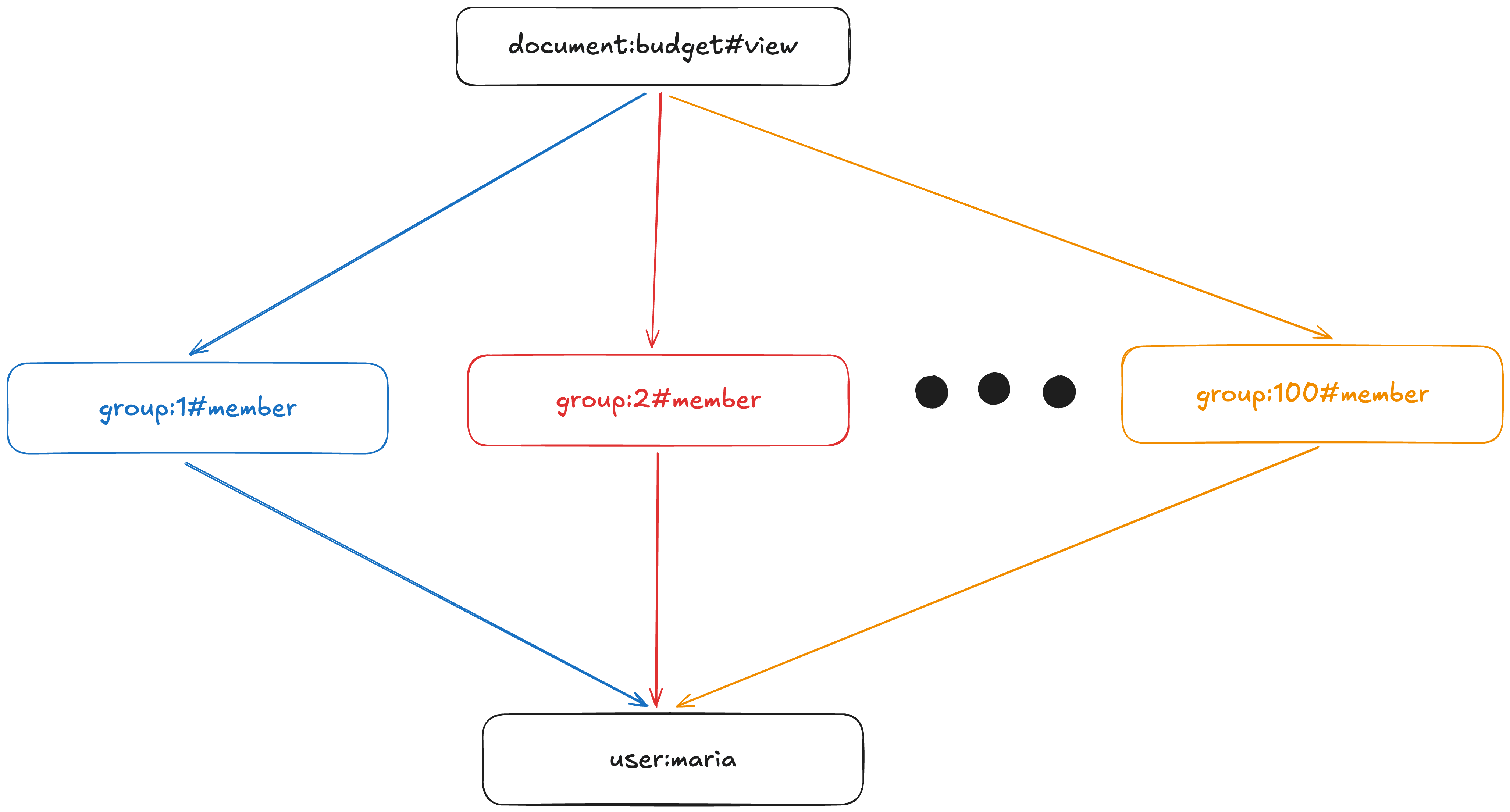
To solve the CheckPermission(document:budget, view, user:maria), we potentially have to explore every colored path in the graph of permissions. We stop when we find one.
However, what happens in the extreme cases (the ones our customers had)?
- if
document:budgetis linked to ZERO groups, we exit early. ⭐ - if
document:budgetis linked to THOUSANDS of groups, that is a lot of work to do! 😭 We have to check every group againstuser:maria. And ifuser:mariabelongs to ZERO groups, we would have done a lot of work for nothing; we could have returnedNO_PERMISSIONright away!
This is the key piece of information that we were not using: the shape of the relationships. For example: how many groups are there? Are users members of one or a million groups?
Or, put differently: if we start exploring a sub-graph, how much time will we need? How expensive is it?
Improving performance of intersections
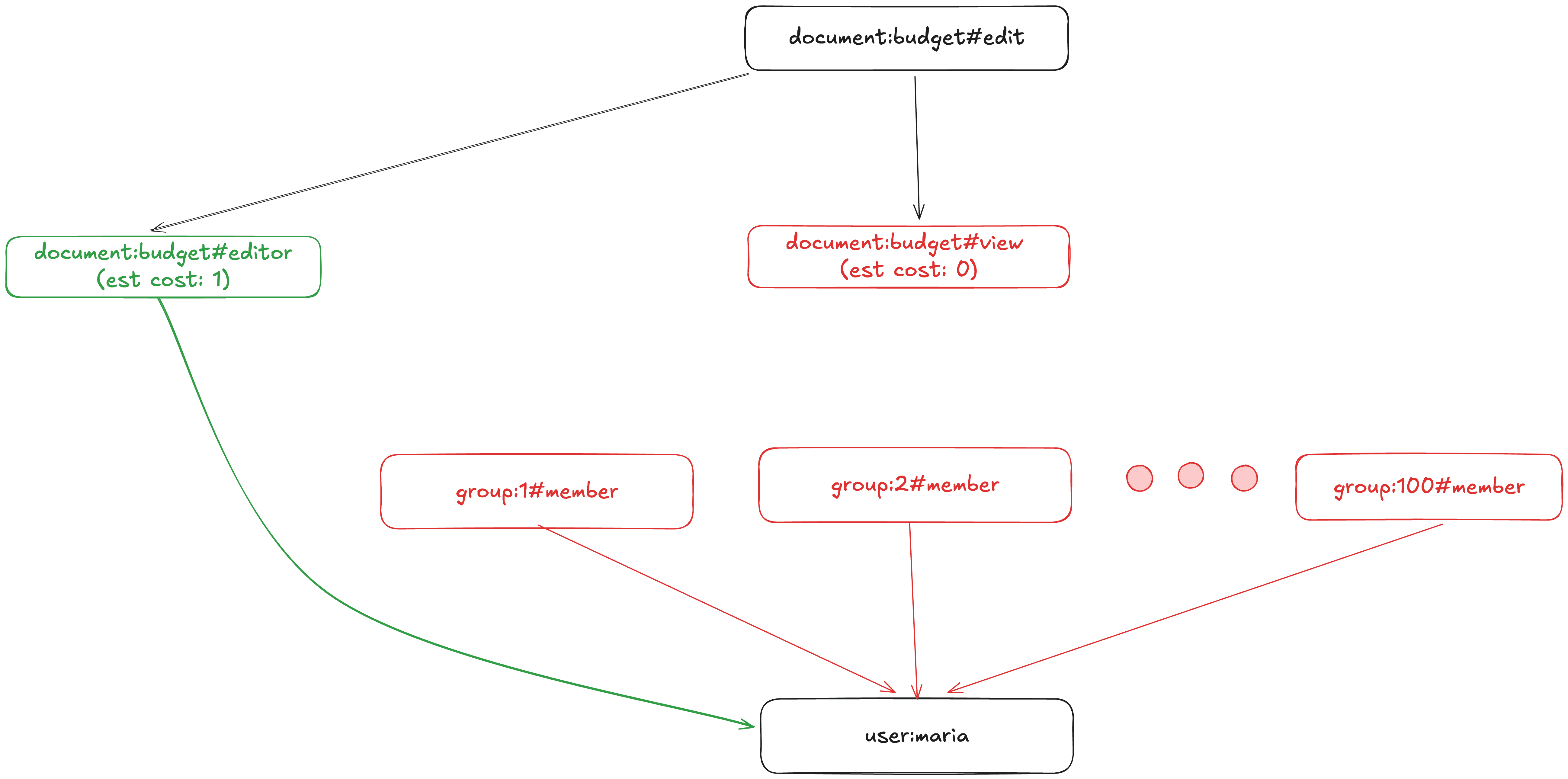
Now imagine that the CheckPermission call is for document:budget, edit, user:maria. This permission is an intersection. Solving this question is roughly equivalent to traversing the graph below as fast as possible until we reach user:maria.
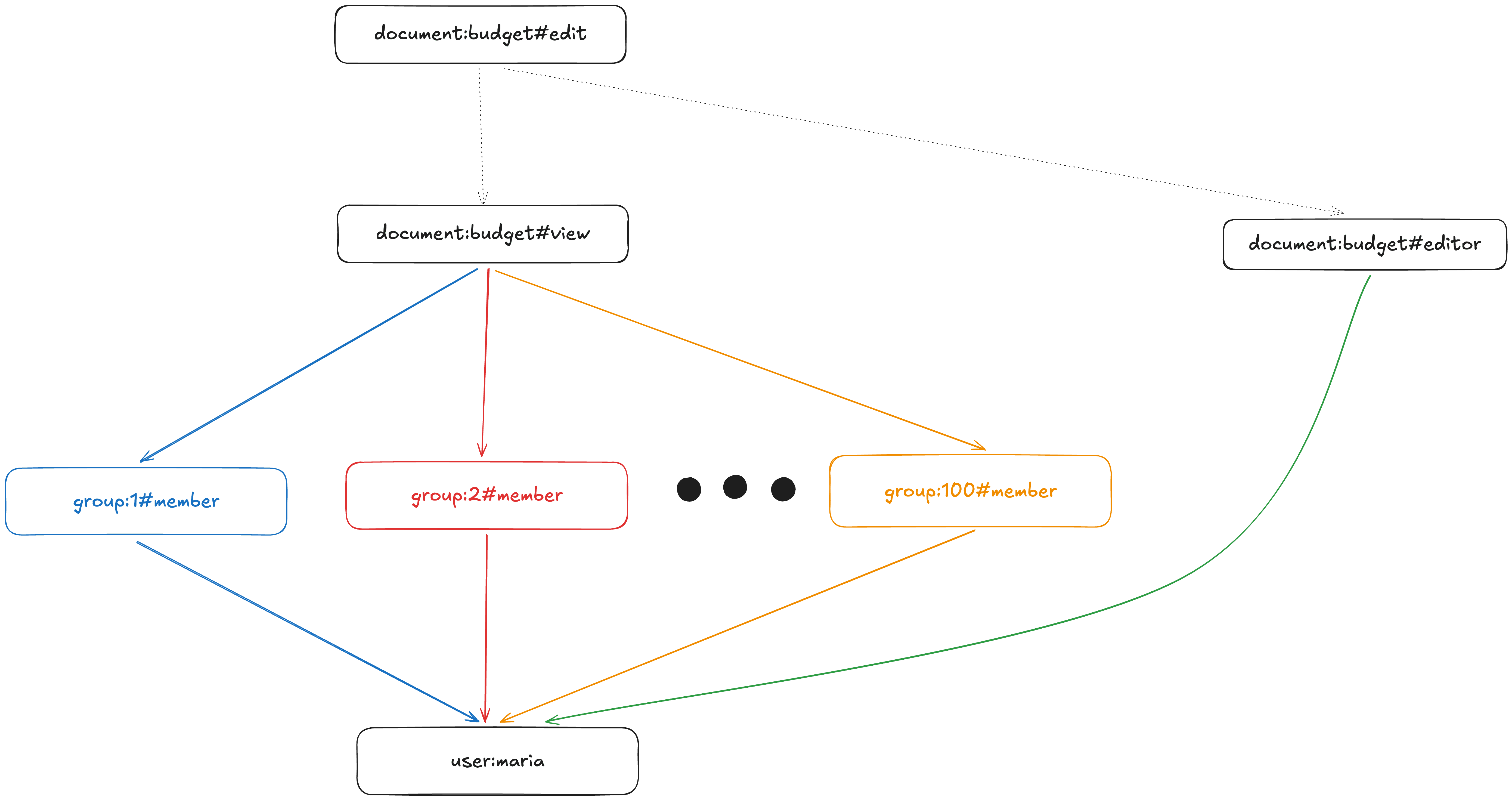
To solve this intersection we potentially have to explore every colored path.
Intersections are special, however: if one of the sub-permissions returns NO_PERMISSION, we can short-circuit immediately. So, for example, if we check the #editor path first and find we can’t reach the subject, we don’t need to explore the other paths!
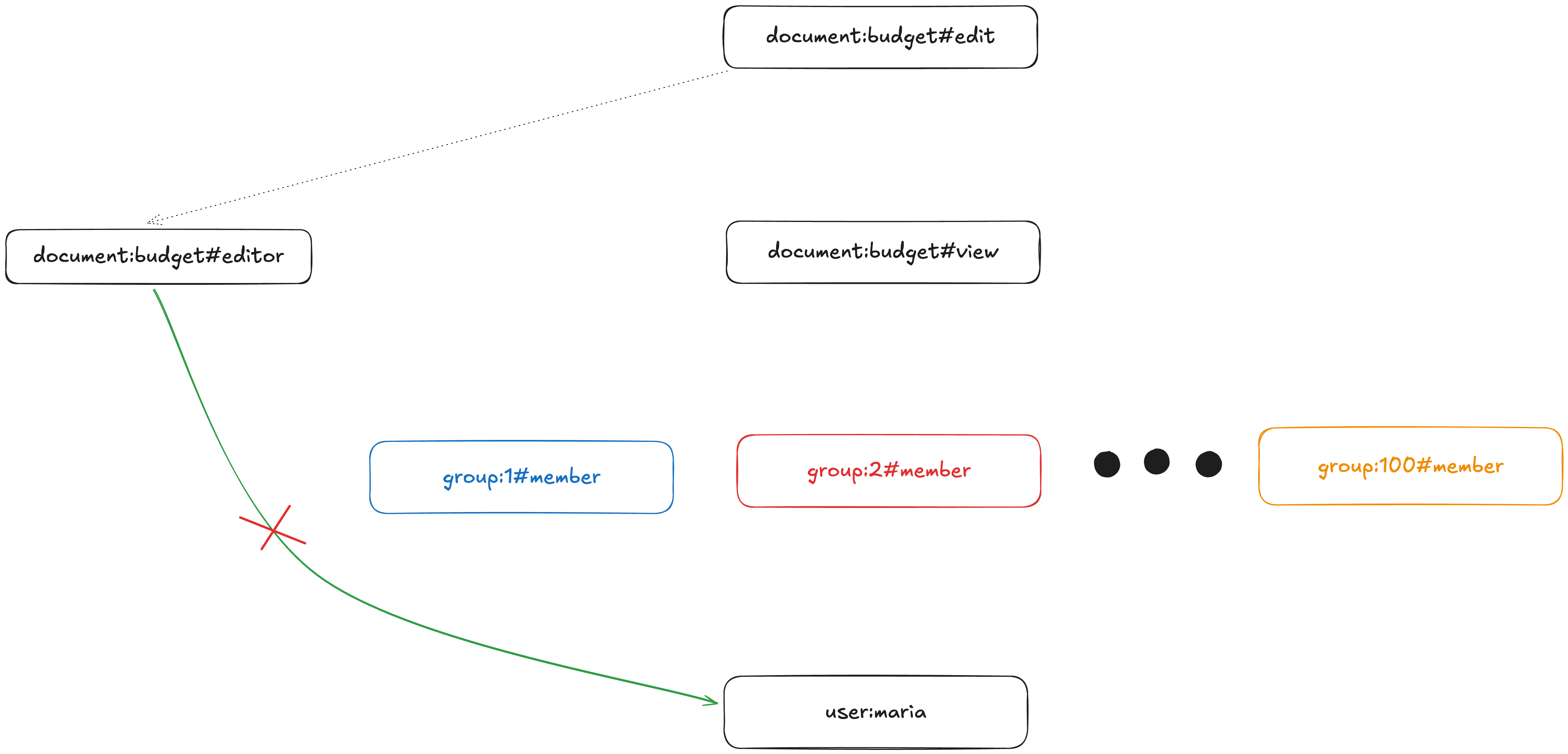
If user:maria is NOT an editor, we do NOT need to explore the group#member paths!
Today, to resolve this intersection, SpiceDB will try to explore the view and editor paths in parallel, with no preference as to what path it evaluates first. But, if we knew that the editor set had zero or near-zero elements, we could have tried that path first and only if it succeeds we would have gone down the potentially expensive path of evaluating view.
The broad problem here is that SpiceDB takes a simple approach: it doesn’t make decisions at query time about the fastest way to explore a graph to solve a query, because it doesn’t know the average cost of exploring a sub-graph.
Enter: the Query Planner
The query planner is our new experimental implementation of the CheckPermission API (and other APIs, as we progress) that decides at query time how to resolve a check in a way that minimizes work through the use of various optimizations. It’s the means by which SpiceDB will make smart decisions based on the shape of the query and graph.
The first step is to understand the shape of a query in the abstract. Let’s consider our document:budget, view, user:maria query. We know that for this query, when we consider the schema:
- The
viewpermission refers to thegroupdefinition’smemberrelation - The
groupdefinition’smemberrelation points at auser
One way to think about the arrow operation is the way we phrased it above:
For every group that is related to
document:budget, find the members. Then, find ifuser:mariais one of them.
However, we can also phrase it in terms of set intersections, or as a JOIN in database-speak:
There’s 0 or more groups connected to
document:budget, and there’s 0 or more groups thatuser:mariais a member of. Is there at least one group in common between the two sets?
This phrasing of the problem is the key that unlocks our first optimization: we can choose which set to look at first, depending on which set we expect to be smaller, and then the subsequent problem space is smaller. In other words, we can reorder the evaluation of an arrow depending on the shape of the data, provided that we have statistics about our data. These statistics are then stored alongside our graph and provide an estimation of cost of traversal. The two examples below demonstrate this:
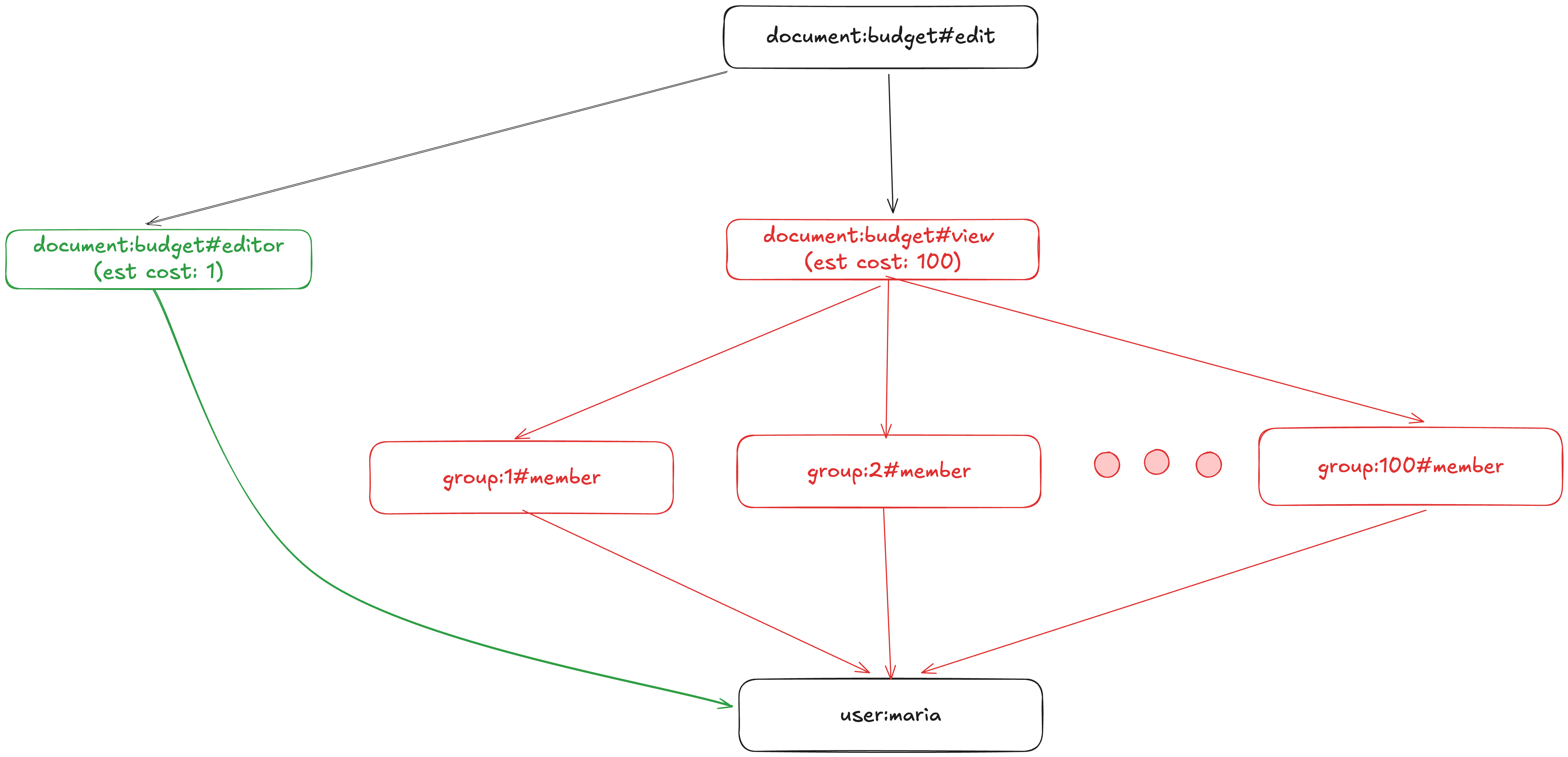
The query planner converts our graph traversal into a smart traversal using cost estimates. In this case, exploring the view subgraph has high cost because both sides of the group->member arrow contain many elements.
The query planner converts our graph traversal into a smart traversal using cost estimates. In this case, exploring the view subgraph has low cost because the left-hand side of the group->memberarrow has zero elements.
We can make a similar optimization for unions (+) by ordering the relations from largest-to-smallest respectively, and we’ll continue adding additional optimizations and heuristics as time goes on.
Query Plan Trees
How we represent a query plan allows us to make these changes and modify how we evaluate a query at runtime. The query plan is a tree of operations, each step representing a set of paths reachable in the graph. We may not directly evaluate every node in this tree, but these provide building blocks we can reorder to change how it gets evaluated.
In our example, the basic level of iterator is direct group membership: a group member that points at a user — let’s call this Relation(group:member) . Similarly, the document is assigned to a group by its relation, Relation(document:group).
The view permission, then, represented as a document belonging to a group, is the arrow, group->member. Now our tree looks like Arrow(Relation(document:group), Relation(group:member)) .
Then we can layer on the next fact; an editor is a Relation(document:editor) and the edit permission requires a path that is a view permission and an editor relation. We already have view permission, that’s given above! So we need to intersect these two sets, giving us the final tree of
Intersection(
	Relation(document:editor),
	Arrow(
		Relation(document:group),
		Relation(group:member),
	)
)
This is the object that we can use to reorder blocks, rebalance the tree, and find the optimal evaluation configuration.
What’s Next?
We have our abstract query planner structure in place and we have a starting set of optimizations that can be made based on the structure of your schema and statistical estimates about the cost of each graph traversal. In the near future, we’ll be adding more statistics sources that will be effective at various scales, feeding additional optimizations as time goes on.
Query planners can be somewhat fickle. They’ll often perform very well for 95% of cases and then strange or downright insane behavior for the remaining 5%; we’ve experienced this ourselves with the Postgres query planner a number of times. We’ll be putting the planner through its paces with a set of tests, both real-world and contrived, before turning it on by default, and we’ll let you know when it’s ready for experimental usage in your own workload.
We’d also love to hear from you if you find an edge case - drop a SpiceDB issue or a Discord message. We’re always looking for feedback as we seek to fix broken authorization.
Last but not least, if this work sounds interesting to you, please hop over to our Careers page. We are hiring!