
There's a yearly tradition where Jake Moshenko, CEO of AuthZed lists his Authorization predictions for the year on livestream (the internet never forgets!). This year, Jake's predictions were influenced by the widespread rise of AI that we've witnessed. One of Jake's predictions was that Agentic RAG will be the new standard way to do RAG.
This makes sense because we've seen RAG implemented in enterprise applications over the past year and as more businesses adopt AI Agents, Agentic RAG will slowly become the standard for RAG systems everywhere.
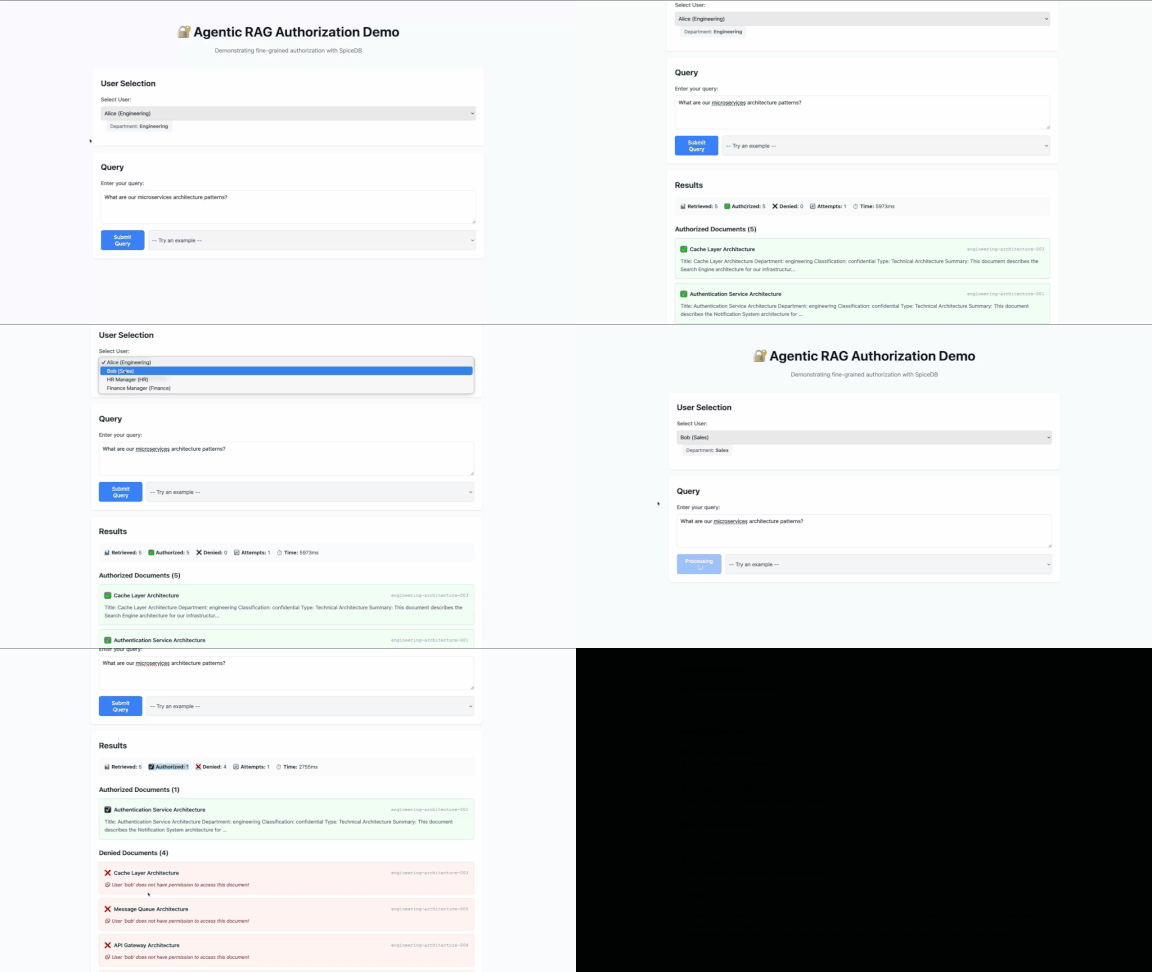
This blog post illustrates how you can build a production-grade Agentic RAG system on AuthZed Cloud. The project ships with 50 documents across four departments: engineering, sales, HR, finance, each siloed to its own team.
- Some docs are shared across department lines
- Some users have one-off grants outside their department, and
- Five public documents ignore the whole structure.
The dataset is not large but the sharing rules and hierarchies make it analogous to the real-world. Using traditional RBAC or row-level security is not scalable or efficient for such use cases. Luckily ReBAC makes it straightforward to mirror these relationships in the schema.
The demo uses Weaviate as the vector database, the OpenAI API as the LLM and the official LangChain - SpiceDB integration for adding fine-grained permissions in the application, and AuthZed Cloud as the permissions system.
The R in RAG is for Retrieval
A standard RAG system follows a simple arc:
Query arrives → documents are retrieved by semantic similarity → an LLM generates an answer.
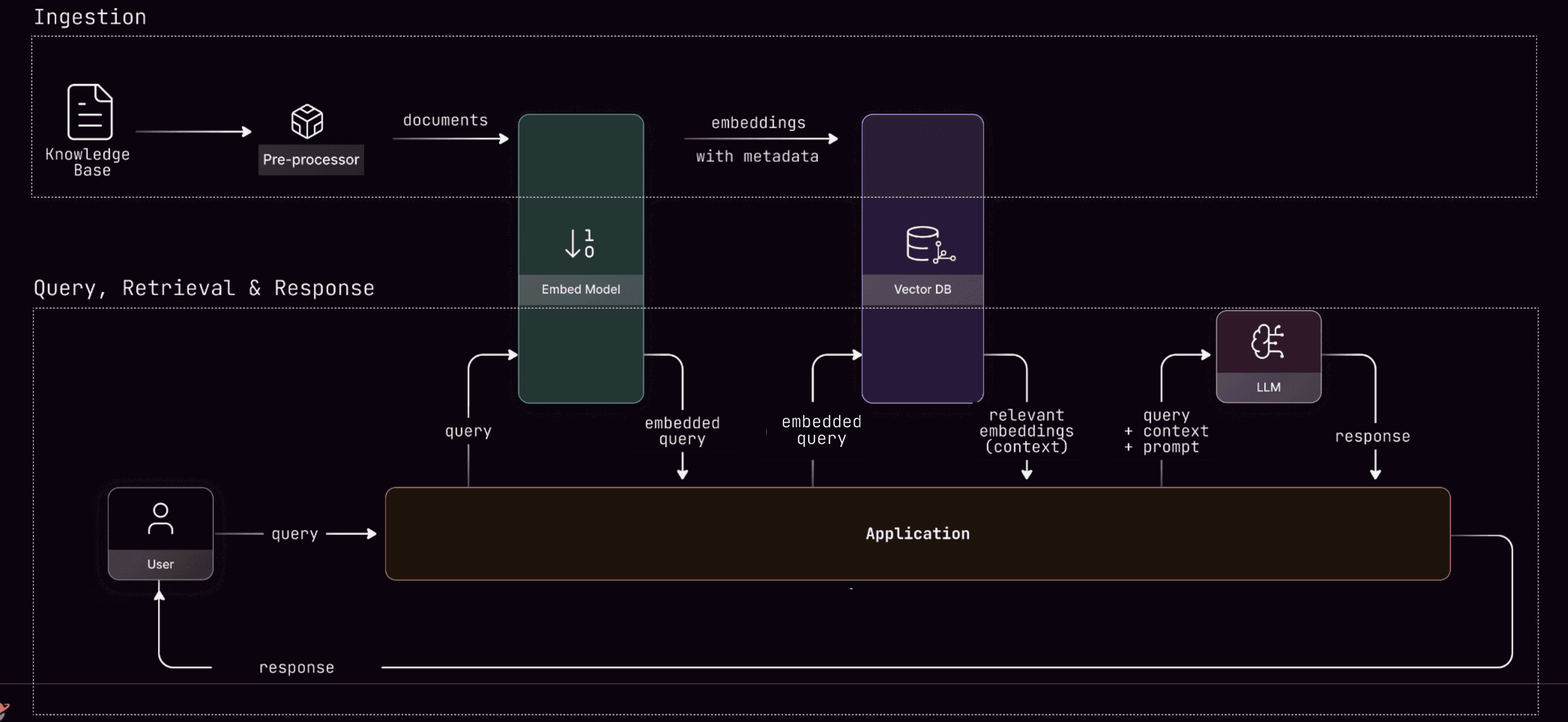
Most RAG systems don't include a "check if the user is allowed to see this" step and this is a big problem! It's no surprise that Broken Access Control topped OWASP's list for Top Security Risks for Web Apps for the second time in a row. And with AI and Agentic systems this problem is compounded — an AI Agent making a chain of autonomous decisions can create more security problems, if authorization is not handled correctly.
Authorization can't be a prompt instruction ⚠️
A convenient solution is to tell the LLM "only use documents the user is authorized to see." This is actually an anti-pattern. The agent can reason about what to retrieve and why authorization failed but it cannot be allowed to reason about whether authorization applies. That distinction is critical to understand why security breaches can happen in Agentic AI systems.
And that's what this demo illustrates. The architecture in this demo is a four-node LangGraph pipeline where authorization is hardcoded into the graph flow, not a tool the agent can call or skip. In this setup the AI Agent has a reasoning node that activates if authorization fails. The LLM analyzes why access was denied and decides whether a different retrieval strategy might find documents the user can access. But the authorization node is part of the workflow and cannot be skipped.
workflow.add_node("retrieve", retrieval_node)
workflow.add_node("authorize", authorization_node)  # ALWAYS runs
workflow.add_node("reason", reasoning_node)
workflow.add_node("generate", generation_node)

# Define flow - start directly at retrieval
workflow.set_entry_point("retrieve")
workflow.add_edge("retrieve", "authorize")  # Deterministic authZ
The authorization is performed under the hood by SpiceDB which fundamentally answers the question:
Is this actor allowed to perform this action on this resource?
In this specific example the actor is the logged-in user, the action is being able to view the document in the RAG and the resource is the specific document from where the information has been retrieved. Simply put — "Is the user authorized to view information from this document?"
The authorization node makes no LLM calls and doesn't reason. It asks SpiceDB if the user has read access for the doc, gets a deterministic yes or no, and then passes only the approved docs forward.
If SpiceDB returns an error, it passes nothing — a pattern that's known as 'fail closed'. In the world of authorization, you would rather have a false negative (denying permission to a resource even though the user can access it) than a false positive (allowing permission to a resource that the user cannot access). The latter results in data leaks that unfortunately happen way too often in our industry.
A minimal schema that does a lot
The SpiceDB schema backing this is simple:
definition user {}

definition department {
    relation member: user
}

definition document {
    relation owner: user
    relation viewer: user | department#member

    permission view = viewer + owner
    permission edit = owner
}
Four patterns fall out of it: department-based access, cross-department grants, individual exceptions, and public documents. SpiceDB also supports hierarchical departments, role-based access, and conditional permissions should you need it.
One bulk request, not five sequential ones
When retrieval returns a handful of documents, you'd rather utilize a single check instead of separate permission checks for each doc. SpiceDB's CheckBulkPermissions API handles multiple permission checks in a single request:
def batch_check_permissions(client, subject_id, documents):
    items = [
        CheckBulkPermissionsRequestItem(
            resource=ObjectReference(object_type="document", object_id=doc.metadata["doc_id"]),
            permission="view",
            subject=SubjectReference(
                object=ObjectReference(object_type="user", object_id=subject_id)
            ),
        )
        for doc in documents
    ]
    response = client.CheckBulkPermissions(CheckBulkPermissionsRequest(items=items))
    # permissionship 2 = HAS_PERMISSION
    return [doc for doc, pair in zip(documents, response.pairs)
            if pair.item.permissionship == 2]
This is a single network round-trip instead of N. And on any exception, the function returns an empty list, not the full document set.
Getting on AuthZed Cloud takes five minutes
For a production-grade permissions system you want to run on AuthZed Cloud — the easiest way to run managed SpiceDB. To get started:
-
Sign in at app.authzed.cloud/signup to create a Permissions System. You can get $700 in AuthZed Cloud credits to experiment, through the AuthZed Cloud Starter Program.
-
Once signed in, create a SpiceDB deployment:
- Choose the region where the deployment will live.
- Choose the number of vCPUs for your deployment. The recommendation is to start with 4 vCPUs and then monitor the Metrics and change it based on your workload.
- Choose the number of replicas to deploy SpiceDB with primarily read workloads. The recommendation is 3 but will depend on your latency requirements.
Before using the Permissions System, configure access to it. This enables organizations to apply the principle of least-privilege to services accessing SpiceDB. For example: read-only tokens can be created for services that should never need to write to SpiceDB.
Configure access
- Create a Service Account for your RAG application.
- Create a Token for that service account and drop it in your
SPICEDB_TOKENenv var. - Create a Role with the permissions your pipeline needs (
ReadSchema,WriteSchema,WriteRelationships,ReadRelationships,CheckPermission), then bind it to the service account via a Policy.
You're now ready to use your AuthZed Cloud Permissions system.
Running on Prod
The full reference implementation of this project is can be found here.
The sample repo runs a Docker container with SpiceDB and a Weaviate Database running locally. To change that to AuthZed Cloud (and a Weaviate DB instance in the cloud) make the following changes:
Change
client = Client(
    "localhost:50051",
    insecure_bearer_token_credentials("devtoken"),
)
to:
from grpcutil import bearer_token_credentials

client = Client(
    "grpc.authzed.com:443",
    bearer_token_credentials("your-token-here"),
)
And your .env to:
SPICEDB_ENDPOINT=grpc.authzed.com:443
SPICEDB_TOKEN=<token from your AuthZed Cloud service account>
And similarly for Weaviate Cloud which uses API key auth and a different connection method.
Change
client = weaviate.connect_to_local()
to:
client = weaviate.connect_to_wcs(
    cluster_url="https://your-cluster.weaviate.network",
    auth_credentials=weaviate.auth.AuthApiKey("your-api-key"),
)
And your .env file to:
WEAVIATE_URL=https://your-cluster.weaviate.network
WEAVIATE_API_KEY=<your weaviate api key>
You'd also need to add WEAVIATE_API_KEY to the config class wherever WEAVIATE_URL is read, since the local setup doesn't have that field.
Relearning the same lessons
The industry spent a decade figuring out that you can't trust the client to enforce access control for human users. We're working out the same thing for AI agents now, just that the speed and scale is much higher than human users.
Check out the AuthZed Cloud Starter program to receive $700 in AuthZed Cloud credits and see the value of scalable authorization infrastructure.